Introduction
Today (2023.03.02), OpenAI released the latest GPT-3.5 Turbo API, currently priced at $0.002/1k tokens1.
warning
The information in this article is time-sensitive; please verify accordingly.
Usage Guide
The official documentation is here2, which is obviously more detailed than what I’ve written 233. Unless something unexpected happens, I still recommend checking the official docs.
After writing this, I realized it might actually be more detailed than the official docs! 233
Registration
warning
You may need a free internet environment for this. Also, if you are using proxy software, you must set `HTTP_PROXY` and `HTTPS_PROXY` in your command-line environment when running the program below, otherwise you will encounter access errors. On Windows, you can use the `set` command, `set HTTP_PROXY=http://127.0.0.1:xxxx`; on Linux, you can use the `export` command, `export HTTP_PROXY=http://127.0.0.1:xxxx`, where `xxxx` is the proxy software port number.
First, register for a developer account on OpenAI Platform, then generate an API Key on the API Keys page.
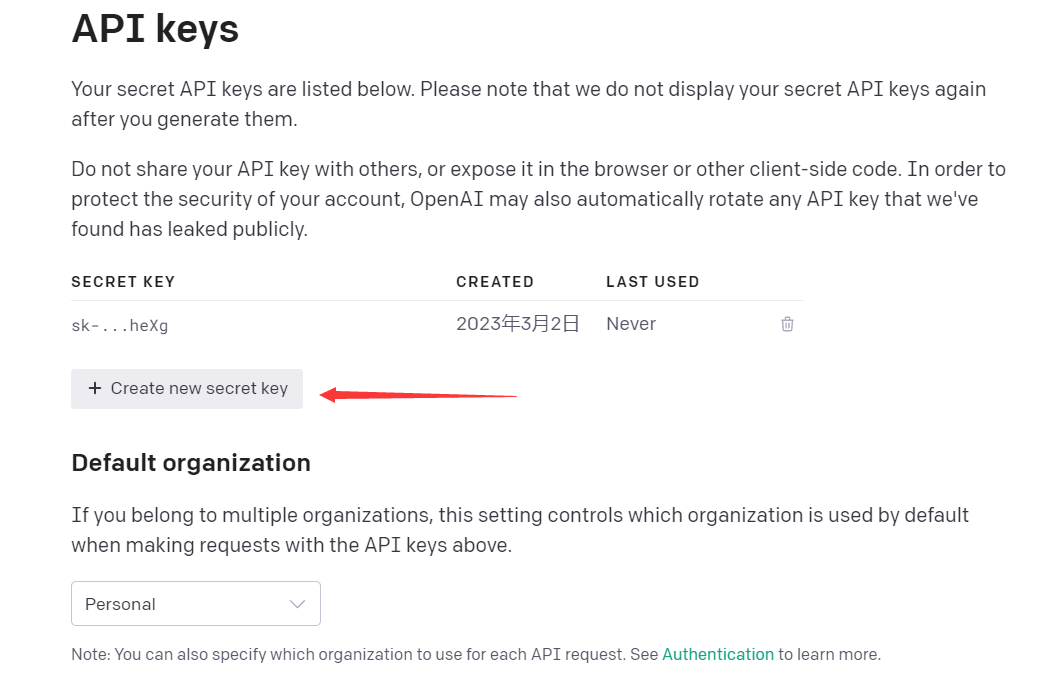
Create API Key
Currently, OpenAI provides $18 in free credits for one month, which should be more than enough for testing.

One month of free credits
Demo Example
Let’s get started! Before beginning, you need to install the openai library; the current latest version is v0.27.0.
| |
If you have installed it before, you might need to upgrade it.
| |
Below is a demo provided by the official documentation; simply replace the API key text with your own, and it will run directly.
| |

Say Hi to GPT 3.5 Turbo
This way, we have successfully greeted GPT-3.5 Turbo!
Advanced Usage # 1
Let’s look at a longer example first.
| |
First, you need to use the ChatCompletion from the openai library, then call the create method to create a ChatCompletion object, which contains our request information.
Let’s observe the request format:
model: No need to explain this; it is the model name. Currently, we are testing thegpt-3.5-turbomodel, and only two models are supported:gpt-3.5-turboandgpt-3.5-turbo-0301. Models with dates in their names will not be updated, but for today, the two are identical.messages: This is a list where each element is a dictionary. Therolein the dictionary represents the message. Currently, three types are supported:user,system, andassistant.contentrepresents the content of the message.system: System message, used to set the behavior of ChatGPT.user: User message, used to interact with ChatGPT.assistant: Assistant message, used to help store ChatGPT’s previous responses.
Let’s look at the complete response.
| |
This is actually an example of multi-turn conversation. If you want to dynamically conduct multi-turn conversations, you must record and pass all previous responses each time.
First, we set the system message, whose content is You are a helpful assistant.. Then we set the user message, whose content is Who won the world series in 2020?; this message serves as the information from the previous turn. Next, we set the assistant message, whose content is The Los Angeles Dodgers won the World Series in 2020., meaning ChatGPT’s response in the previous turn. Finally, we set the user message, whose content is Where was it played?, representing the question for this turn, i.e., the question we currently want GPT to answer.
As you can see, the received response content is The 2020 World Series was played at Globe Life Field in Arlington, Texas.. We only asked about the location, but ChatGPT already knew from the previous responses that this turn was about the 2020 World Series and answered accordingly.
At the same time, we can also see the usage field, which indicates how many tokens were used in this request: prompt_tokens is the number of input tokens, completion_tokens is the number of tokens in the ChatGPT response, and total_tokens is the total number of tokens used. This round consumed 75 tokens.
Advanced Usage # 2
Let’s look at a more complex example.
| |
The prompt here is adapted from 3; the prompt itself is unrelated to the parameters I’m explaining.
This involves more parameters:
temperature: 0.0 to 2.0 (default 1.0) Temperature. Higher values make the output more random; lower values make it more deterministic (or regular).top_p: 0.0 to 1.0 (default 1.0) An alternative to temperature, also known as nucleus sampling. It is recommended not to usetemperatureandtop_psimultaneously.top_pindicates that the model only considers the toptop_ptokens by probability. For example,top_p=0.1means the model only considers the top 10% of tokens by probability.n: number (default 1) The number of responses to generate.stream: boolean (default False) Whether to use streaming mode. If set toTrue, partial message chunks will be sent incrementally, just like in ChatGPT. What does that mean? It means a few words are sent to you one by one, allowing you to dynamically update the text as you wait for the full response in ChatGPT.stop: string or array (default None) Tokens used to stop generation. It can be a single string or a list of strings. If it’s a list, generation stops as soon as any one of the tokens appears, with a maximum of 4 tokens allowed.max_tokens: inf (default 4096 - prompt_token) The maximum number of tokens to generate.frequency_penaltyandpresence_penalty: -2.0 to 2.0 (default 0) Used to penalize repeated tokens. More details about these parameters are available in 4. One appears to handle frequency, while the other handles presence (as an integer). The higher the values of these two parameters, the less likely the generated text will repeat.
The formula is as follows:
| |
logit_bias: dict (default None) Used to adjust token probabilities; accepts JSON. Values range from -100 to 100. -100 effectively disables the word, while 100 forces its use if relevant.user: dict (default None) Used to set user information. For specifics, refer to 5, mainly to prevent abuse.
The output of this code is as follows (since Chinese characters are escaped in JSON, I’ve replaced them with placeholders here).
| |
Advanced Usage # 3
Here’s an example regarding the steam parameter.
| |
When streaming mode is enabled, the response will be a stream of data rather than a single object containing all data, and this returned object is iterable. Below is an example of a returned item. Note that delta may not always contain content, so a check is necessary.
In other words, ChatGPT actually already has the complete result before outputting it; it just spits out words one by one to drag out the time on the frontend?!
| |
Advanced Usage # 4
Here’s an example regarding the stop parameter.
| |
Here, we still have it play the role of a translator to translate a line from Apex Legends spoken by Octane. We use “无” (none) as the stop condition; when the output encounters “无”, generation stops and the result is returned. The output is as follows:
| |
As you can see, the output is directly cut off, and the interrupted word is automatically converted into a token. However, I haven’t yet thought of any practical application for this –
Error
I encountered this error several times while using it. It wasn’t due to issues with my request format; it was likely because too many people were making requests simultaneously. The error message looks like this:
| |
Conclusion
I can only say this pricing is incredibly cheap. It feels like many companies won’t even bother trying to replicate it themselves. Instead, they’ll just use the library. It offers good performance, no need to worry about costs, electricity, compute power, or other factors, and the price is low. I feel that even small companies with their own models might find that compute and electricity costs alone are significantly higher than the API. After all, this also comes down to utilization rates.
Additionally, I feel this has also changed the translation market to some extent. Taking Tencent Cloud’s translation API as an example, if you calculate the price roughly, it’s about 3 times that of the GPT-3.5 Turbo API. However, including input tokens, it’s more like 1.5 times, and it comes with other features, including rewriting and polishing.
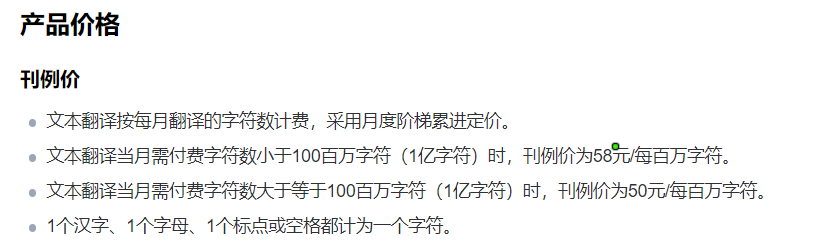
Tencent Cloud Translation API pricing
Through experience, you can also find that if you input long texts every time, tokens are consumed quite quickly, as both input and output are billed. At the same time, if you want to conduct session-level conversations, your token consumption will grow rapidly: each turn multiplies by 2, and when accumulated, it becomes quadratic. So, the cost of long conversations is actually quite significant.
However, unfortunately, OpenAI currently only supports virtual credit card payments. Domestic users who want to pay out of pocket may need to find their own solutions.
Do you remember that last September I wrote a blog post about my thoughts on Stable Diffusion6? Now, looking at the SD models again, they seem to be a century behind… LoRA, ControlNet… If SD only impacted the art and design fields, then the potential of ChatGPT’s large models is truly vast and will affect many industries, because the diversity of outputs is incredibly rich. For example, someone might use it to generate code to drive machines, and so on7… Application scenarios depend entirely on imagination. However, there are currently scientific issues. If a more powerful knowledge base could be established to provide theoretical backing during output, the application scenarios of this model would become even broader, such as in healthcare, finance, and other fields with higher demands for evidence and decision-making.