Preface
As everyone knows, TikTok is region-locked and cannot be used normally within China. I’ve wanted to try out TikTok for a long time but never succeeded until now.
Today, while browsing GitHub, I came across this method, but the project’s README was incomplete, so I wrote this article to document the process.
Preparation
First, you need a US Apple ID and a scientific internet software such as Shadowrocket, Quantumult X, or Surge.
Additionally, the following software needs to be installed:
- iTunes v12.6.5.3 (requires a lower version, 64-bit | 32-bit)
- i4Tools (requires connecting your phone via USB cable)
- iOS Any Version APP Downloader v6.0: 52pojie Thread
Configuring the Proxy
You can basically follow this GitHub repository README1, but their documentation is a bit messy. I’ve organized it slightly here since I only have Shadowrocket, so I’ll use it as the example.
info
Note: If you have previously installed TikTok, please uninstall it before configuring the proxy!!!
Open Shadowrocket
Click the
配置at the bottom, then click theibehind your active configuration ->HTTPS 解密->开启 HTTPS 解密->生成新的CA证书->安装证书Open your phone’s Settings. The first few lines will show
已下载描述文件. Click安装, enter the password, click安装, then click安装, and finally click完成Open phone Settings ->
通用->关于本机->证书信任设置-> LocateShadowrocketand enable TrustOpen Shadowrocket, click the
配置at the bottom ->模块-> Add and unlock the regions you want to view Japanhttps://raw.githubusercontent.com/Semporia/TikTok-Unlock/master/Shadowrocket/TiKTok-JP.confKorea
https://raw.githubusercontent.com/Semporia/TikTok-Unlock/master/Shadowrocket/TiKTok-KR.confUnited States
https://raw.githubusercontent.com/Semporia/TikTok-Unlock/master/Shadowrocket/TiKTok-US.confTaiwan
https://raw.githubusercontent.com/Semporia/TikTok-Unlock/master/Shadowrocket/TiKTok-TW.confClick the
配置at the bottom, click theibehind your active configuration ->规则-> Top-right+icon ->类型-> SelectRULE-SET->策略-> SelectPROXYor other policy you wish to use (usually the proxy server node corresponding to the region) -> Fill in the Rule Set URL text boxhttps://raw.githubusercontent.com/Semporia/TikTok-Unlock/master/Shadowrocket/TikTok.list
This completes the proxy configuration.
Downloading Older Versions of TikTok
First, download and install iTunes, then log in with your US account.
Open iOS Any Version APP Downloader v6.0, select 美国, search for TikTok, and right-click 查看历史版本.
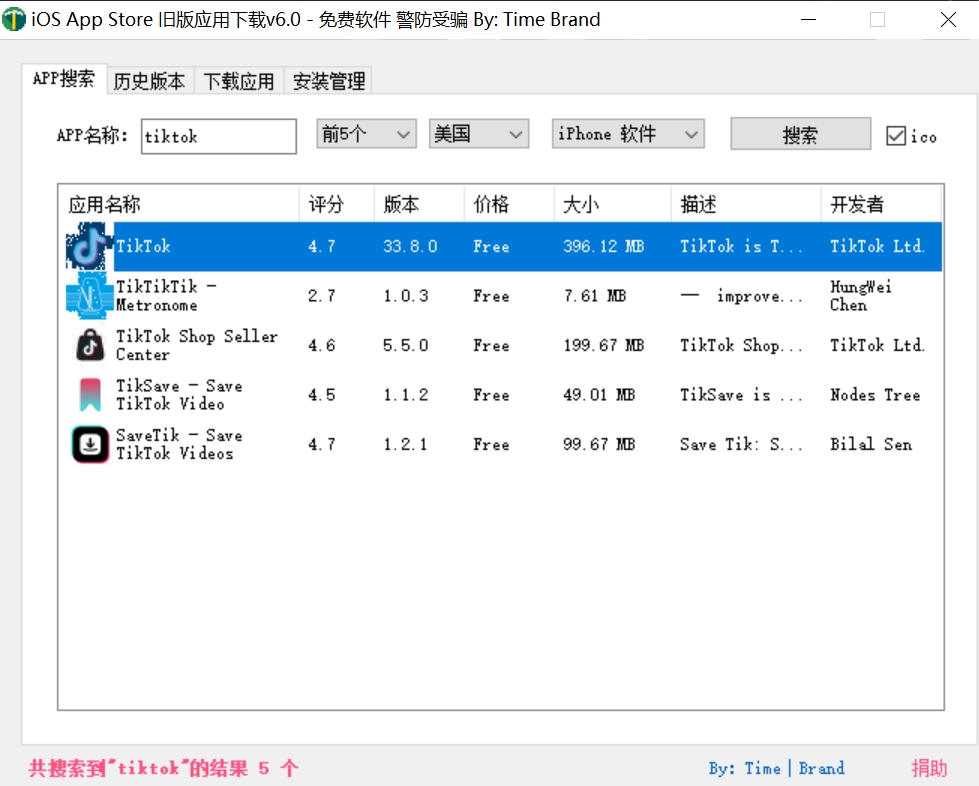
Search for Historical TikTok Versions
Scroll down to find the 21.1.0 version and right-click to download.
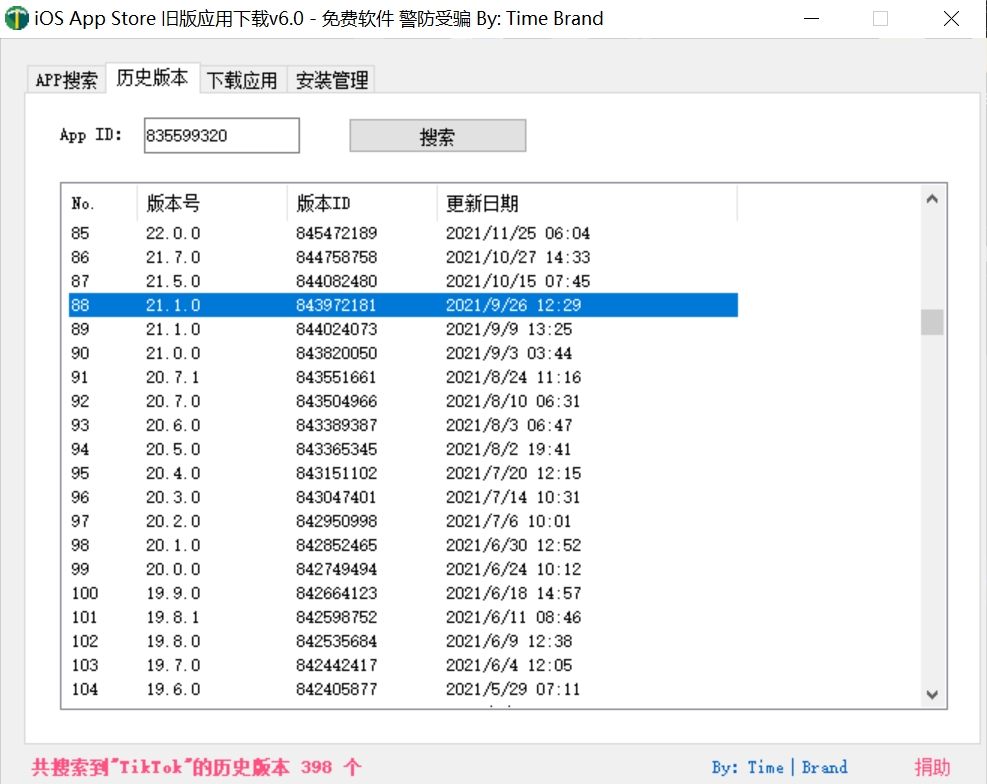
Locate TikTok Version 21.1.0
You will be redirected to an interception page. At this point, search for TikTok in iTunes, find the corresponding app, and click Download.
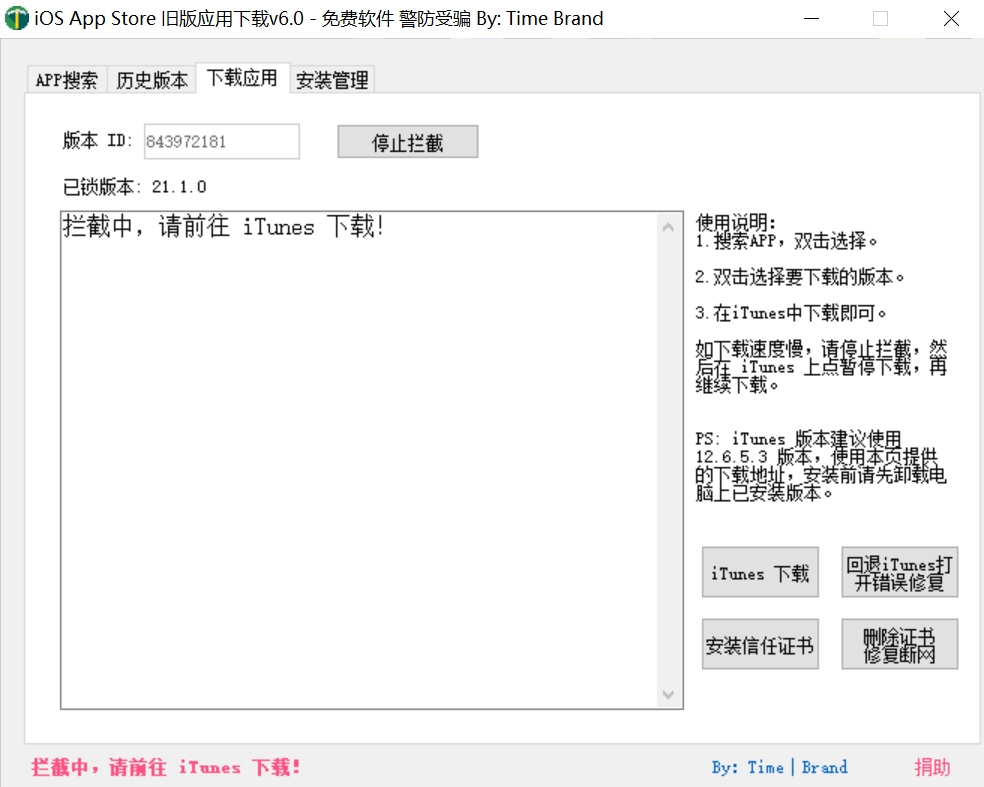
Download TikTok
The download might fail at this stage, but the software has successfully intercepted it. You can pause the download, stop the interception, and then restart the download.
The default download path for iTunes is C:\Users\用户名\Music\iTunes\iTunes Media\Mobile Applications. Locate the downloaded TikTok 21.1.0.ipa file.
Installing TikTok
Open 爱思助手, connect your phone to the computer, and click 信任.
If you haven’t used it before, 爱思助手极速版 will be installed on your phone. You need to open it once; otherwise, installation might fail due to the service not starting.
Click 应用游戏, import from local files to install, and locate the TikTok 21.1.0.ipa file you just downloaded to complete the installation.
If it asks you to select topics of interest upon opening, the installation was successful! Congratulations, you can now use TikTok normally!
Conclusion
Launch!

TikTok! Launch!